
Mobile Payments
Mobile Payment Processing: The Complete Guide for Small Business Owners
Accepting credit cards on the move is no longer a luxury—it is a requirement for modern service and retail businesses. This guide breaks down the hardware, costs, and strategies to process mobile payments without losing your margins.
Mobile payment processing has changed the way small businesses operate by allowing owners to take their storefront anywhere. Whether you are running a food truck in Gulf Shores, a mobile pet grooming service in Alabama, or a contracting business that visits job sites, the ability to swipe or tap a card on the spot is vital. If you are just starting out, you might also want to check out our detailed look at credit card processing for mobile business to see how different industries adapt to these tools.
What Is Mobile Payment Processing?
At its simplest, mobile payment processing is the technology that lets you accept credit and debit card payments using a mobile device like a smartphone or tablet. Instead of being tethered to a heavy countertop terminal and a phone line, you use an app and a small card reader. These readers connect via Bluetooth or a charging port. Some newer systems, like the ones we show in our live demo, are standalone handheld devices that have their own cellular connection. This means you do not even need to pair them with your phone.
For a small business owner, this technology removes the friction of billing. Instead of sending an invoice and waiting 30 days for a check, you get paid before you leave the job site. This improves cash flow and reduces the time you spend chasing down late payments. It also provides a better experience for your customers, who often prefer the security and convenience of paying with a card or a mobile wallet like Apple Pay.
Types of Mobile Card Readers and Hardware
Not all mobile hardware is created equal. The right choice depends on how often you sell and where you are located. There are three main categories of mobile hardware used today:
- Plug-in Readers: These are the smallest and cheapest options. They plug into the headphone jack or lightning port of your phone. While they are portable, they can be fragile and sometimes fail to connect during a busy rush.
- Bluetooth Readers: These are more reliable. They sit on a table or clip to your belt and talk to your phone wirelessly. They usually support EMV (chip) and contactless (tap) payments, which are much more secure than old-school magnetic swipes.
- Smart Terminals: These are the gold standard. Devices like the Clover Flex or specialized PayWavez handhelds are all-in-one units. They have a built-in screen, a printer for receipts, and a cellular SIM card. If you operate in areas like Gulf Shores where Wi-Fi might be spotty at an outdoor market, these are the best choice because they stay connected via 4G or 5G.
Understanding Mobile Payment Processing Fees
This is where many business owners get confused. There is a common myth that mobile processing is always more expensive than traditional processing. While some "flat-rate" providers charge a high premium for the convenience of mobile, it does not have to be that way. Most mobile transactions are considered "Card Present" as long as you dip the chip or tap the phone. Card Present rates are significantly lower than "Card Not Present" rates (like when you type a number into a computer).
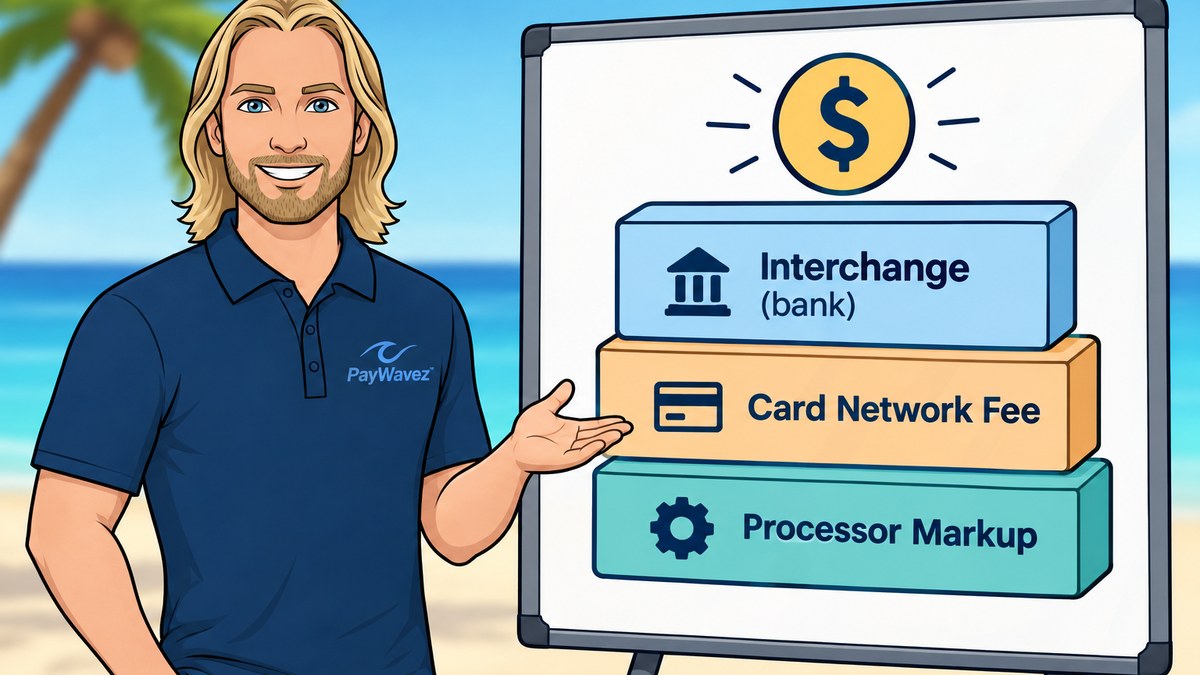
When looking at your statement, you will likely see interchange fees. These are the base costs set by Visa and Mastercard. On top of that, your processor adds a markup. If you are using a flat-rate model, you might pay 2.6% plus $0.10 for every tap. If you have a high-volume business, an Interchange Plus model is usually cheaper because the markup is transparent and lower. Understanding these fees is the first step toward keeping more of your hard-earned money.
Accepting payments on the go should not mean sacrificing your profit margin to hidden fees or high flat-rate markups.
Surcharging and Dual Pricing for Mobile Users
One of the best ways to handle mobile payment processing costs is through surcharging or dual pricing. Surcharging allows you to pass the cost of the credit card processing fee directly to the customer. For example, if a customer pays with a credit card, a small fee (usually around 3% to 4%) is added to the total. If they pay with cash or a debit card, they do not pay the fee. This is completely legal in most states, including Alabama, as long as you follow specific signage and notification rules.
Dual pricing is a slightly different approach where you display two prices: one for cash and one for card. This is often more popular with customers because it feels like a "cash discount" rather than a penalty for using a card. For mobile businesses like HVAC repair or landscaping, this can save thousands of dollars a year in fees. Since you are already providing a service at a customer's home, explaining the cash vs. card price is a natural part of the checkout process.
Security and Chargeback Prevention on the Go
Security is a major concern when you are processing payments in the field. Using a mobile device means you are responsible for keeping that data safe. Fortunately, modern mobile readers use encryption and tokenization. This means the card data is turned into a random code before it even leaves the reader, so it is never actually stored on your phone or tablet. This makes it very difficult for hackers to steal information.
Chargebacks are another risk. A chargeback happens when a customer disputes a charge with their bank. To protect yourself, always use an EMV chip reader. If you swipe a card's magnetic stripe instead of using the chip, you are held liable for any fraud that occurs. Additionally, mobile apps allow you to take a photo of a signed work order or the finished job and attach it to the transaction. This digital paper trail is your best defense if a customer later claims they didn't receive the service.
How to Choose the Right Mobile Merchant Account
When you are looking for a provider, do not just look at the hardware. You need a partner that understands the unique needs of a mobile business. If you are located in the southern US, you might look at our Alabama payment processing hub to see local support options. A good provider will offer:
- Next-Day Funding: You should not have to wait a week to get your money.
- Transparent Reporting: You should be able to see exactly what you paid in fees for every single transaction.
- Offline Mode: Some readers allow you to take a payment even when you have no signal, and then process it once you get back to Wi-Fi.
- Customer Support: If your reader breaks at a Saturday morning farmer's market, you need someone you can call immediately.
Avoid contracts that lock you in for years or have high "early termination fees." The best processors earn your business every month with good service and fair rates.
Conclusion: Moving Forward with Mobile Payments
Setting up your business for mobile success is about more than just buying a little plastic reader. It is about choosing a system that scales with you, protects your data, and keeps your costs low. By using strategies like dual pricing and choosing the right smart terminal, you can turn payment processing from a headache into a competitive advantage. If you want to dive deeper into industry-specific setups, remember to revisit our guide on credit card processing for mobile business. Ready to see the hardware in action? Contact us today for a free consultation.
Ready to see your own numbers?
Run your real card volume through the calculator or apply in about two minutes.